Wednesday, December 12, 2007

Data center

A data center is a facility used to house computer systems and associated components, such as telecommunications and storage systems. It generally includes redundant or backup power supplies, redundant data communications connections, environmental controls (air conditioning, fire suppression, etc.), and special security devices

History

Data centers have their roots in the huge computer rooms of the early ages of the computing industry. Early computer systems were complex to operate and maintain, and needed a special environment to keep working. A lot of cables were necessary to connect all the parts. Also, old computers required a lot of power, and had to be cooled to avoid overheating. Security was important; computers were expensive, and were often used for military purposes. For this reason, engineering practices were developed since the start of the computing industry. Basic design guidelines for controlling access to the computer room were devised. Elements such as standard racks to mount equipment, elevated floors, and cable trays (installed overhead or under the elevated floor) were introduced in this early age, and have modernized relatively little compared to the computer systems themselves.

During the boom of the microcomputer industry, and especially during the 1980s, computers started to be deployed everywhere, in many cases with little or no care about operating requirements. However, as IT operations started to grow in complexity, companies grew aware of the need to control IT resources. With the advent of client-server computing, during the decade of 1990, microcomputers (now called "servers") started to find their places on the old computer rooms. The availability of inexpensive networking equipment, coupled with new standards for network cabling, made it possible to use a hierarchical design which put the servers in a specific room inside the company. The use of the term "data center", as applied to specially design computer rooms, started to gain popular recognition about this time.

The boom of data centers came during the dot-com bubble. Companies needed fast Internet connectivity and non-stop operation to deploy systems and establish a presence on the Internet. Installing such equipment was not viable for many smaller companies. Many companies started building very large facilities, called "internet data centers", or IDCs, which provide businesses with a range of solutions for systems deployment and operation. New technologies and practices were designed to handle the scale and the operational requirements of such large scale operations. These practices eventually migrated towards the private data centers, and were largely adopted because of their practical results.

As of 2007, data center design, construction, and operation is a well-known discipline. Standard documents from accredited professional groups, such as the Telecommunications Industry Association, specify the requirements for data center design. Well-known operational metrics for data center availability can be used to evaluate the business impact of a disruption. There is still a lot of development being done in operation practice, and also in environmentally-friendly data center design.

Requirements for modern data centers

Racks of telecommunications equipment in part of a data center.

IT operations are a crucial aspect of most organizational operations. One of the main concerns is business continuity; companies rely on its informations systems to run its operations. If a system becomes unavailable, company operations may be impaired or stopped completely. It is necessary to provide a reliable infrastructure for IT operations, in order to minimize any chance of disruption. Information security is also a concern, and for this reason a data center has to offer a secure environment which minimizes the chances of a security breach. A data center must therefore keep high standards for assuring the integrity and functionality of its hosted computer environment.

Data center classification

The TIA-942:Data Center Standards Overview describes the requirements for the data center infrastructure. Four tiers The simplest is a Tier 1 data center, which is basically a computer room, following basic guidelines for the installation of computer systems. The most stringent level is a Tier 4 data center, which is designed to host mission critical computer systems, with fully redundant subsystems and compartmentalized security zones controlled by biometric access controls methods.

Physical layout
A typical server "cage", commonly seen in colocation.

A data center can occupy one room of a building, one or more floors, or an entire building. Most of the equipment is often in the form of servers racked up into 19 inch rack cabinets, which are usually placed in single rows forming corridors between them. This allows people access to the front and rear of each cabinet. Servers differ greatly in size from 1U servers to huge storage silos which occupy many tiles on the floor. Some equipment such as mainframe computers and storage devices are often as big as the racks themselves, and are placed alongside them.

The physical environment of the data center is usually under strict control:

  • Air conditioning is used to keep the room cool; it may also be used for humidity control. Generally, temperature is kept around 20-22 degrees Celsius (about 68-72 degrees Fahrenheit). The primary goal of data center air conditioning systems is to keep the server components at the board level within the manufacturer's specified temperature/humidity range. This is crucial since electronic equipment in a confined space generates much excess heat, and tends to malfunction if not adequately cooled. Air conditioning systems also help keep humidity within acceptable parameters. The humidity parameters are kept between 35% and 65% Relative Humidity. Too much humidity and water may begin to condense on internal components; too little and static electricity may damage components. ASHRAE recommends a temperature range of 20-25 °C and humidity range of 40 - 60% as optimal for data center conditions.[citation needed]
  • Backup power is catered for via one or more uninterruptible power supplies and/or diesel generators.
  • To prevent single points of failure, all elements of the electrical systems, including backup system, are typically fully duplicated, and critical servers are connected to both the "A-side" and "B-side" power feeds. This arrangement is often made to achieve N+1 Redundancy in the systems. Static switches are sometimes used to ensure instantaneous switchover from one supply to the other in the event of a power failure.
  • Data centers typically have raised flooring made up of 60 cm (2 ft) removable square tiles. These provide a plenum for air to circulate below the floor, as part of the air conditioning system, as well as providing space for power cabling. Data cabling is typically routed through overhead cable trays in modern data centers. Smaller/less expensive data centers without raised flooring may use anti-static tiles for a flooring surface.
  • Data centers often have elaborate fire prevention and fire extinguishing systems. Modern data centers tend to have two kinds of fire alarm systems; a first system designed to spot the slightest sign of particles being given off by hot components, so a potential fire can be investigated and extinguished locally before it takes hold (sometimes, just by turning smoldering equipment off), and a second system designed to take full-scale action if the fire takes hold. Fire prevention and detection systems are also typically zoned, and high-quality fire-doors and other physical fire-breaks used, so that even if a fire does break out it can be contained and extinguished within a small part of the facility.
  • Using conventional water sprinkler systems on operational electrical equipment can do just as much damage as a fire. Originally Halon gas, a halogenated organic compound that chemically stops combustion, was used to extinguish flames. However, the use of Halon has been banned by the Montreal Protocol because of the danger Halon poses the ozone layer. Unlike fire extinguishing agents that displace oxygen, Halon did not pose a great risk to people caught in the data center when it was discharged. More environmentally-friendly alternatives include Argonite and FM-200, and even systems based on mists of tiny particles of ultra-pure water. There are also systems available which can control the gas mixture of the air so as to lower the oxygen content below the level at which combustion can take place but still high enough to support human life (similar to very high altitudes).
  • Physical security also plays a large role with data centers. Physical access to the site is usually restricted to selected personnel. Video camera surveillance and permanent security guards are almost always present if the data center is large or contains sensitive information on any of the systems within.

Network infrastructure

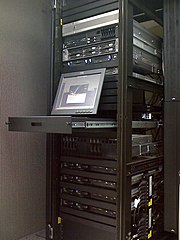
An example of "rack mounted" servers.

Communications in data centers today are most often based on networks running the IP protocol suite. Data centers contain a set of routers and switches that transport traffic between the servers and to the outside world. Redundancy of the Internet connection is often provided by using two or more upstream service providers (see Multihoming).

Some of the servers at the data center are used for running the basic Internet and intranet services needed by internal users in the organization: e-mail servers, proxy servers, DNS servers, etc.

Network security elements are also usually deployed: firewalls, VPN gateways, Intrusion detection systems, etc. Also common are monitoring systems for the network and some of the applications. Additional off site monitoring systems are also typical, in case of a failure of communications inside the data center.

Applications

Multiple racks of servers, and how a data center commonly looks.

The main purpose of a data center is running the applications that handle the core business and operational data of the organization. Such systems may be proprietary and developed internally by the organization, or bought from enterprise software vendors. Such common applications are ERP and CRM systems.

Often these applications will be composed of multiple hosts, each running a single component. Common components of such applications are databases, file servers, application servers, middleware and various others.

Data centers are also used for off site backups. Companies may subscribe to backup services provided by a data center. This is often used in conjunction with backup tapes. Backups can be taken of servers locally on to tapes., however tapes stored on site pose a security threat and are also susceptible to fire and flooding. Larger companies may also send their backups off site for added security. This can be done by backing up to a data center. Encrypted backups can be sent over the internet to data center where they can be stored securely.

Security-as-a-Service

Security-as-a-Service refers to the practice of delivering traditional security applications as an Internet-based service, on-demand, to consumers and businesses.

Security-as-a-Service is analogous to the conventional Software-as-a-Service model, whereby security applications are delivered as a service using the Internet as the delivery mechanism. In the consumer market, the most common of these are the “anti-“ suite, including anti-virus, anti-spam and anti-spyware.

In the enterprise market, Security-as-a-Service refers to the delivery of second-tier infrastructure components, such as log management and asset tracking, in a service-oriented fashion, also leveraging the Internet as the delivery and access mechanism.

History

The term ‘Security-as-a-Service’ was first used in the consumer market in the year 2001. McAfee filed a controversial patent for delivering security software as a service over the Web in August 2001.

In the enterprise market, security services vendor Vigilar introduced the first enterprise security-as-a-service solution with the introduction of its ATLAS solution in June 2007.

Vendors in the SMB market who deliver “Security-as-a-Service solutions include McAfee, Watchfire, and Jamcracker. In the enterprise market, vendors who provide security-as-a-service solutions include ISS, Panda Software, Qualys, and Vigilar.

Why Security-as-a-Service

Certain aspects of security are uniquely designed to be optimized for delivery as a Web-based service. These include:

  • offerings that require constant updating to combat new threats, such as anti-virus and anti-spyware software for consumers
  • offerings that require a high level of expertise, often not found in-house, and which can be conducted remotely. These include ongoing maintenance, scanning, patch management and troubleshooting of security devices.
  • offerings that manage time and resource-intensive tasks, which may be cheaper to outsource and offshore, delivering results and findings via a Web-based solution. These include tasks such as log management, asset management and authentication management.

Key Characteristics

Security-as-a-Service applications are generally priced on a per-user basis on the consumer side, and a per-device basis on the enterprise side. Pricing may also depend on bandwidth and storage requirements. SaaS costs to the buyer and revenue streams to the vendor are therefore lower initially than traditional software license fees, but are also recurring, and therefore viewed as more predictable, much like maintenance fees for licensed software. In addition, because the functionality is delivered as a service, rather than a device or piece of software, fees fall under operating expenses, rather than capital expenditures, for most customers.

Security-as-a-Service vs. Managed Security Services

Unlike previous generations of Managed Security Services, security-as-a-service does not require the customer to give up complete control over their security posture. Instead, internal administrators can control their security policies, upgrade systems, etc. via a web-based interface. Internal administrators maintain control of their security policies and can change them without calling an outsourced provider, but at the same time gain useful information regarding a devices status and history (uptime, current and past patch levels, outstanding support issues) and other device-centric information on demand via a web interface.

Anti-theft system

An anti-theft system is any device or method used to prevent or deter the unauthorized appropriation of items considered valuable. Theft is one of the most common and oldest criminal behaviours. Where the ownership of a physical possession can be altered without the rightful owner's consent, theft prevention has been introduced to assert the ownership whenever the rightful owner is physically present. Anti-theft systems have been around since individuals began stealing other people's property and have evolved accordingly to thwart increasingly complex methods of theft. From the invention of the first lock and key to the introduction of RFID tags and biometric identification, anti-theft systems have evolved to match the introduction of new inventions to society and the resulting theft of them by others.

Theft: Motive and Opportunity

Under normal circumstances, theft is prevented simply through the application and social acceptance of property law. Ownership is often indicated by means of visual marking (license plates, name tags). When clear owner identification is not possible and when there is a lack of social observance, people may be inclined to take possession of items to their own benefit at the expense of the original owner. Motive and opportunity are two enabling factors for theft. Given that motives for theft are varied and complex and are generally speaking not within the control of the victim, most methods of theft prevention rely on reducing opportunities for theft.

Motives for actively preventing theft

Items may require an anti-theft system for a variety of reasons, which may occur in combination depending on the type of item and its use:

  • the item is expensive and/or has sentimental value (prestigious car, family heirloom, birthday gift, war medals, coin collection)
  • the item is difficult/impossible to replace if lost (produced in low numbers, antiques, unique works of art)
  • the item is easy to steal (retail/supermarket products, office stationery)
  • the item may be left unattended in an unsafe environment (laptops in a library, cars in a carpark)
  • inappropriate use of the item may cause considerable damage or may enable further unauthorized acts (theft of car keys, stolen building access keys, identity theft)
  • the item is desirable to others (jewelry, mobile phones, rare collectibles, auto parts, industrial designs)

Use of Theft Prevention

Equally varied are the methods developed for theft prevention. Anti-theft systems have evolved to counter new theft techniques as they have appeared in society. The choice for a particular anti-theft system is dependent on several factors:

Financial Cost

In addition to the initial acquisition cost of an item, the cost of replacement or recovery from its theft is usually considered when considering the cost of installing an anti-theft system. This cost estimation usually determines the maximum cost of the anti-theft system and the need to secure it. Expensive items will generally be secured with higher-cost anti-theft systems, while low-cost items will generally be secured at low cost. Insurance companies will often mandate a minimum type of anti-theft system as part of the conditions for insurance.

Threshold for Theft

Anti-theft systems are designed to raise the difficulty of theft to an infeasible (but not necessarily impossible) level. The kind of system implemented often depends on the acceptable threshold for theft. For example, keeping money in an inside shirt pocket raises the difficulty of theft above that necessary if the pocket were on a backpack, since unauthorized access is made sufficiently more difficult. Methods of theft evolve to decrease the difficulty of theft, increased by newer anti-theft systems. Because of evolution on both sides and the social aspect of theft, the threshold for theft is very dynamic and heavily dependent on the environment. Doors in quiet suburban neighbourhoods are often left unlocked, as the perceived thresholds for theft are very high.

Ease of Use

Security is often compromised through the lax application of theft-prevention practices and human nature in general. The ideal anti-theft device requires no additional effort while using the secured item, without reducing the level of security. In practice, users of security systems may intentionally reduce the effectiveness of an anti-theft system to increase its usability (see passwords). For example, home security systems will often be enabled and disabled using easy-to-remember codes such as "1111" or "123", instead of more secure combinations.

Methods of Theft Prevention

There are a number of general categories of anti-theft systems:

Sequestering of valuable items

A very common method of preventing theft is the placement of valuables in a safe location. The definition of safe depends on the minimum threshold for theft as determined by the owner. Desk stationery is often considered secured if placed in an unlocked drawer away from view, while expensive jewelry might be placed in a safe behind a picture in a home.

Raising the awareness of theft

Another common method is the alerting of other individuals to the act of theft. This is commonly seen in department stores, where security systems at exits alert store employees of the removal of unpaid items. Older car alarms also fall into this category; newer systems also prevent the car from starting.

Preventing Removal of items

Yet another method is the attachment of items to a larger immobile object, usually furniture or walls.

Disabling the stolen item

Items with specific functionality can often be disabled to prevent the use of the item if it should be stolen. The anti-theft system can require disabling on every use, or enabling when the item needs to be secured. Disabling the anti-theft system is usually done by requiring identification of the owner at some stage of use. Identification can occur through physical or other means (physical keys, numerical codes, complex passwords, biometric identification). A passive immobilizer makes car theft almost impossible because the vehicle cannot be started without a computer chip that is found within the ignition key. This can work even retrospectively: as a stolen credit card can easily be invalidated with a phone call to the issuing bank, the motivation to steal one is reduced.

Security Tags

Security tags are devices that are attached to products to prevent shop-lifting. Often used in conjunction with an Electronic article surveillance system.

Tracking Software

Electronic items such as laptops, cell phones and even gadgets such as iPods now have software that enable them to "phone home" with information regarding their whereabouts and other information that can aid law enforcement to track the devices down.

Software Assurance

Software Assurance (SwA) is: “the level of confidence that software is free from vulnerabilities, either intentionally designed into the software or accidentally inserted at anytime during its lifecycle, and that the software functions in the intended manner.”

— Source: Committee on National Security Systems (CNSS) Instruction No. 4009, “National Information Assurance Glossary”, Revised 2006 — http://www.cnss.gov/instructions.html-

Alternate definitions:

[1] From the Department of Homeland Security (DHS), Software Assurance (SwA) addresses:

  • Trustworthiness - No exploitable vulnerabilities exist, either maliciously or unintentionally inserted;
  • Predictable Execution - Justifiable confidence that software, when executed, functions as intended;
  • Conformance - Planned and systematic set of multi-disciplinary activities that ensure software processes and products conform to requirements, standards/ procedures.

Contributing SwA disciplines, articulated in Bodies of Knowledge and Core Competencies: Software Engineering, Systems Engineering, Information Systems Security Engineering, Information Assurance, Test and Evaluation, Safety, Security, Project Management, and Software Acquisition.

- Source: DHS Build Security In web portal, https://buildsecurityin.us-cert.gov/portal

[2] From the Department of Defense (DoD), Software Assurance (SwA) relates to "the level of confidence that software functions as intended and is free of vulnerabilities, either intentionally or unintentionally designed or inserted as part of the software."

- Source: DoD Software Assurance Initiative, 13 September 2005 - https://acc.dau.mil/CommunityBrowser.aspx?id=25749

[3] From the National Institute of Standards and Technology (NIST), Software Assurance (SwA) is "the planned and systematic set of activities that ensures that software processes and products conform to requirements, standards, and procedures to help achieve:

  • Trustworthiness - No exploitable vulnerabilities exist, either of malicious or unintentional origin, and
  • Predictable Execution - Justifiable confidence that software, when executed, functions as intended."

- Source: NIST SAMATE project http://samate.nist.gov/

[4] From the National Aeronautics and Space Administration (NASA), Software Assurance - "Planned and systematic set of activities that ensures that software processes and products conform to requirements, standards, and procedures. It includes the disciplines of Quality Assurance, Quality Engineering, Verification and Validation, Nonconformance Reporting and Corrective Action, Safety Assurance, and Security Assurance and their application during a software life cycle." The NASA Software Assurance Standard also states: "The application of these disciplines during a software development life cycle is called Software Assurance."

- Source: NASA-STD-2201-93 "Software Assurance Standard", 10 November 1992 - http://satc.gsfc.nasa.gov/assure/assurepage.html

[5] From the Object Management Group (OMG), Software Assurance (SwA) is “justifiable trustworthiness in meeting established business and security objectives.”

- Source: OMG Software Assurance (SwA) Special Interest Group (SIG) http://adm.omg.org/SoftwareAssurance.pdf and http://swa.omg.org/docs/softwareassurance.v3.pdf

[6] From Webopedia, "Software Quality Assurance, abbreviated as SQA, and also called software assurance, it is a level of confidence that software is free from vulnerabilities, either intentionally designed into the software or inserted at anytime during its lifecycle, and that the software functions in the intended manner."

- Source: Webopedia on-line encyclopedia - http://www.webopedia.com/TERM/S/Software_Quality_Assurance.html

[7] As indicated in the Webopedia definition, the term "software assurance" has been used as a shorthand for Software Quality Assurance (SQA) when not necessarily considering security or trustworthiness. SQA is defined in the Handbook of Software Quality Assurance as: "the set of systematic activities providing evidence of the ability of the software process to produce a software product that is fit to use." - Source: G. Gordon Schulmeyer and James I. McManus, Handbook of Software Quality Assurance, 3rd Edition (Prentice Hall PRT, 1998)

- - - - - - -

Software Assurance is a strategic initiative of the U.S. Department of Homeland Security (DHS) to promote integrity, security, and reliability in software. The SwA Program is based upon the National Strategy to Secure Cyberspace - Action/Recommendation 2-14: “DHS will facilitate a national public-private effort to promulgate best practices and methodologies that promote integrity, security, and reliability in software code development, including processes and procedures that diminish the possibilities of erroneous code, malicious code, or trap doors that could be introduced during development.” - https://buildsecurityin.us-cert.gov/portal

Software Assurance Metrics and Tool Evaluation (SAMATE) is a NIST project that supports the DHS Software Assurance Program in the identification, enhancement and development of software assurance tools. NIST is leading in (A) testing software evaluation tools, (B) measuring the effectiveness of tools, and (C) identifying gaps in tools and methods. - http://samate.nist.gov/

OMG Software Assurance (SwA) Special Interest Group (SIG), http://swa.omg.org, works with Platform and Domain Task Forces and other software industry entities and groups external to the OMG, to coordinate the establishment of a common framework for analysis and exchange of information related to software trustworthiness by facilitating the development of a specification for a Software Assurance Framework that will:

  • Establish a common framework of software properties that can be used to represent any/all classes of software so software suppliers and acquirers can represent their claims and arguments(respectively), along with the corresponding evidence, employing automated tools (to address scale)
  • Verify that products have sufficiently satisfied these characteristics in advance of product acquisition, so that system engineers/integrators can use these products to build (compose) larger assured systems with them
  • Enable industry to improve visibility into the current status of software assurance during development of its software
  • Enable industry to develop automated tools that support the common framework.

- - - - - - -

Software Security Assurance Publicly Available Resource: The Software Assurance Forum has provided a collaborative venue for stakeholders to share and advance techniques and technologies relevant to software security. The state-of-the-art report (SOAR) on "Software Security Assurance" (published by the Information Assurance Technology Analysis Center) is a free, publicly available resource at http://iac.dtic.mil/iatac/download/security.pdf which represents an output of collaborative efforts of organizations and individuals in the SwA Forum and Working Groups. The SOAR provides an overview of the current state of the environment in which software must operate and surveys current and emerging activities and organizations involved in promoting various aspects of software security assurance. The report also describes the variety of techniques and technologies in use in government, industry, and academia for specifying, acquiring, producing, assessing, and deploying software that can, with a justifiable degree of confidence, be said to be secure. The report also presents observations about noteworthy trends in software security assurance as a discipline.
